Set up the service once, offer it across your team
Shared appointment types keep service details, durations, pricing, and policies together while instructors keep their own availability.
Three instructors offer the same private session. The description changes, so you edit it three times. The price changes, so you do it again. One copy gets missed, and now clients see different information depending on whom they book.
Shared appointment types bring the service’s common settings together. You maintain the offering once and select the staff availability schedules where it is offered.
Share the service, keep the staff schedule
A shared type can hold the description, forms, durations, prices, policies, and other common settings for an appointment service.
Each connected availability schedule still belongs to its staff member and keeps its own hours and date-specific adjustments. Sharing a service does not mean every instructor becomes available at the same time.
For a personal-training service, that can mean one clear offering with several instructors and duration options, instead of a growing collection of near-identical copies.
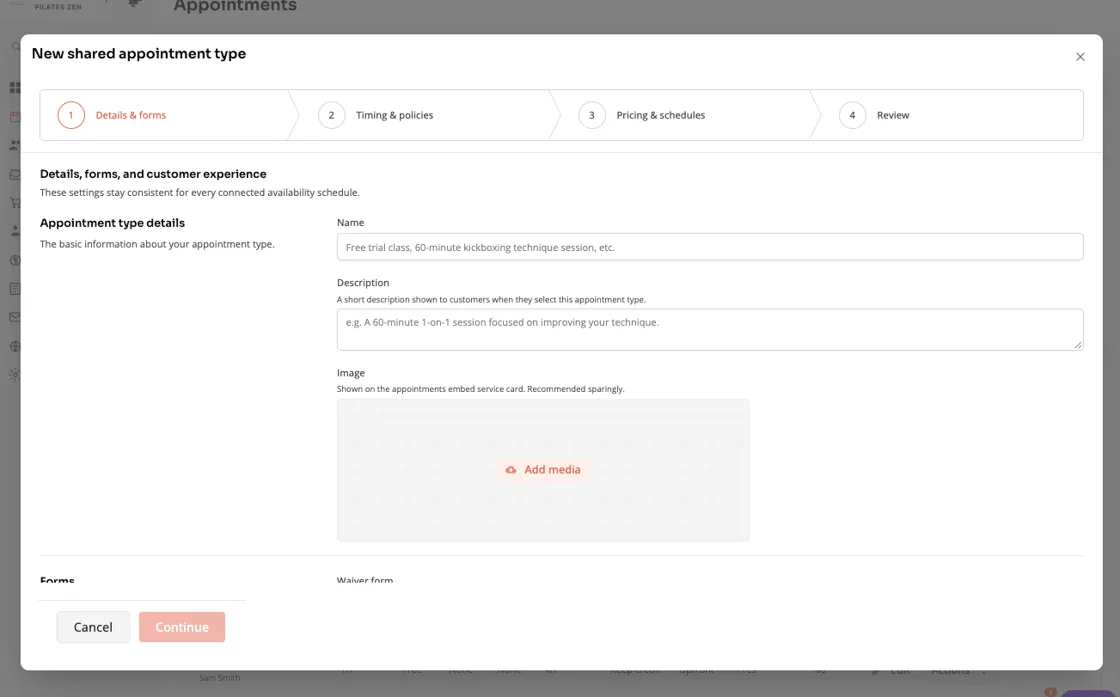
Work through the setup in order
Open Schedule > Appointments > Appointment Types and find the shared appointment section, when enabled for your studio.
Review the details and forms, then the timing and policies. Set the available durations and their prices, choose the schedules that offer the service, and review the changes before saving.
The final review is useful because you may be changing more than one staff offering. Check the scope, rather than assuming the edit affects only the person whose schedule you happened to open.
Bring existing services together deliberately
The grouping workflow helps connect independent appointment types to a shared service. Existing copies can have different prices or policies, so review which shared settings will apply rather than relying on matching names.
An offering that needs individual customization can be detached. It stops receiving later shared changes, and the workflow explains any access consequences you need to review.
Historical bookings and recorded financial activity are not a reason to recreate every appointment from scratch. The grouping and detachment workflows are designed around preserving the existing offering’s identity and booking history.
Keep client access consistent
Shared types also bring product eligibility and booking windows into the service’s setup. You can offer several durations while reviewing which products cover the service and which eligible members can book earlier.
If you are using early booking access, make sure the shared service’s rules match the benefit you advertise.
A better starting point for the next instructor
When someone joins the team, connecting them to an established service is easier to reason about than asking them to recreate all its settings from memory.
You still choose the appropriate schedules and review the result. The difference is that your studio has a shared source for what the service is.
Read the shared appointment guide, or see the September 28-October 12 release notes and October 12-26 grouping update.