How to Set Up Private Appointment Buyouts
Let one customer reserve a whole appointment slot at a flat price when all places are available.
Offer a private session when one customer wants to reserve every seat in an empty appointment slot for a flat price.
Set the price for the whole session
-
Open Schedule → Calendar → Manage → Appointment types and edit the appointment type.
-
In Appointment capacity, check how many customers can book a single time slot. For an appointment that shares room capacity, the selected room sets that number.
-
Turn on Allow private session buyout.
-
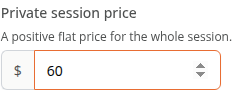
Enter a positive Private session price for the whole session. For example, enter $60 to let one customer reserve both places in an empty two-person appointment for $60.
-
Review Private-session buyout fees if you want separate late cancellation or no-show fees. Save the appointment type.
Check the website booking option
In your website’s appointment booking widget, select the service and check an empty slot for Buy out and the price. When an individual booking has already taken a place, the slot is ineligible for a buyout. Once someone buys out a slot, every place is reserved. A buyout for a shared-capacity appointment reserves the whole room for that booking.
For standard individual bookings, see How to Book a Duet or Semi-Private. For fee rules, see How to Configure Late Cancel and No-Show Settings.
Set up a private buyout for a class.
Need a hand?
Email our team at support@joinzipper.com and we'll usually reply within a few hours.
Was this article helpful?
Thanks for your feedback.