Give instructors the detail behind their payout
Send a dated staff payout report they can reopen in My Payouts, so the explanation stays with the numbers.
“How was my payout calculated?” is a reasonable question. Answering it should not mean recreating the same spreadsheet every pay period.
Zipper lets you send a staff member a dated payout report and gives them a place to find it again in My Payouts. They get the included work and totals, and you keep a record of what you shared.
Share the report you reviewed
Start with the appropriate payout report and choose the period. Review the staff member’s rows and totals, along with any report options that affect what is included.
The send action is available from the supported master, breakdown, and summary payout reports. Before confirming, check the recipient, report type, and dates.
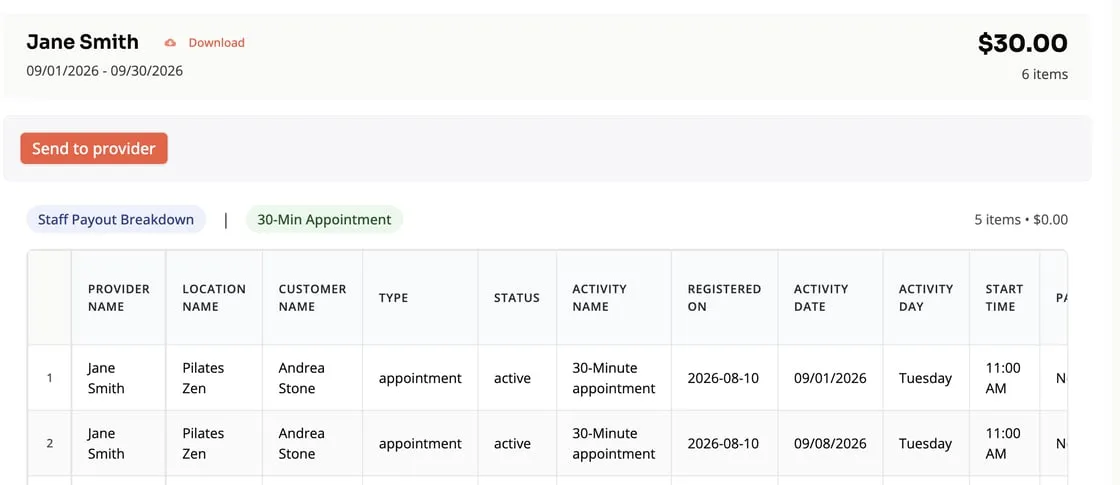
The shared report represents that provider’s visible report content at the time it was sent. It does not give them access to every other staff member’s payout information.
Give the explanation a home
The staff member can return to the saved report in My Payouts. That is useful when the question comes later, after the working report has changed because someone corrected attendance, a rate, or a booking.
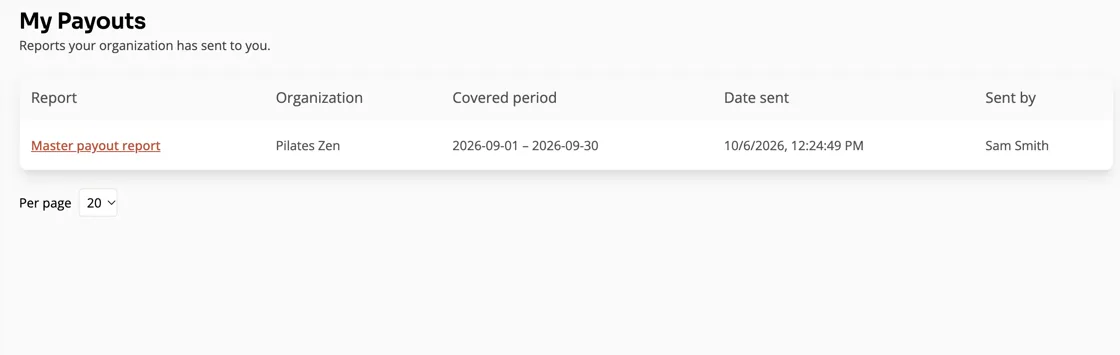
An intentional later send creates a separate dated report instead of silently replacing the previous one. If you share a correction, tell the instructor which report to use and why.
Separate the report from the payment
Sending a payout report shares information. It does not itself move money to the instructor’s bank account or replace the payment process your studio uses.
Treat it as the explanation accompanying that process. Confirm the included dates, review any exclusions, and reconcile the report with the payment you actually make.
The payroll reporting guide is a useful starting point if you are setting up the wider routine.
A simple pay-period habit
Review the report, resolve known attendance or rate questions, and then share the relevant provider’s version. If there is no activity for the period, the send confirmation makes that clear too.
Keeping those steps in the same place helps a small team work from the same explanation, even when the owner and instructor are not at the desk together.
See the step-by-step sharing guide, or read the September 14-28 release notes.