How to Stop an Automation When a Contact Replies
Stop active automation runs when matching contacts respond by SMS or phone.
How to Stop an Automation When a Contact Replies
Use Unenroll contact when they reply to stop active runs for matching leads and contacts in your business after a new SMS reply, inbound call, or voicemail.
Turn On Reply Unenrollment
- Go to Marketing > Automations and open the workflow.
- Select Unenroll contact when they reply near the top of the builder. Select the information icon beside it to review the current explanation.
- Save the workflow. On a draft, the main Save button also publishes and activates it. Choose Save options > Save draft if you are still preparing it, and Save when the workflow is ready.
- Enable the setting separately on each automation where you want this behavior.
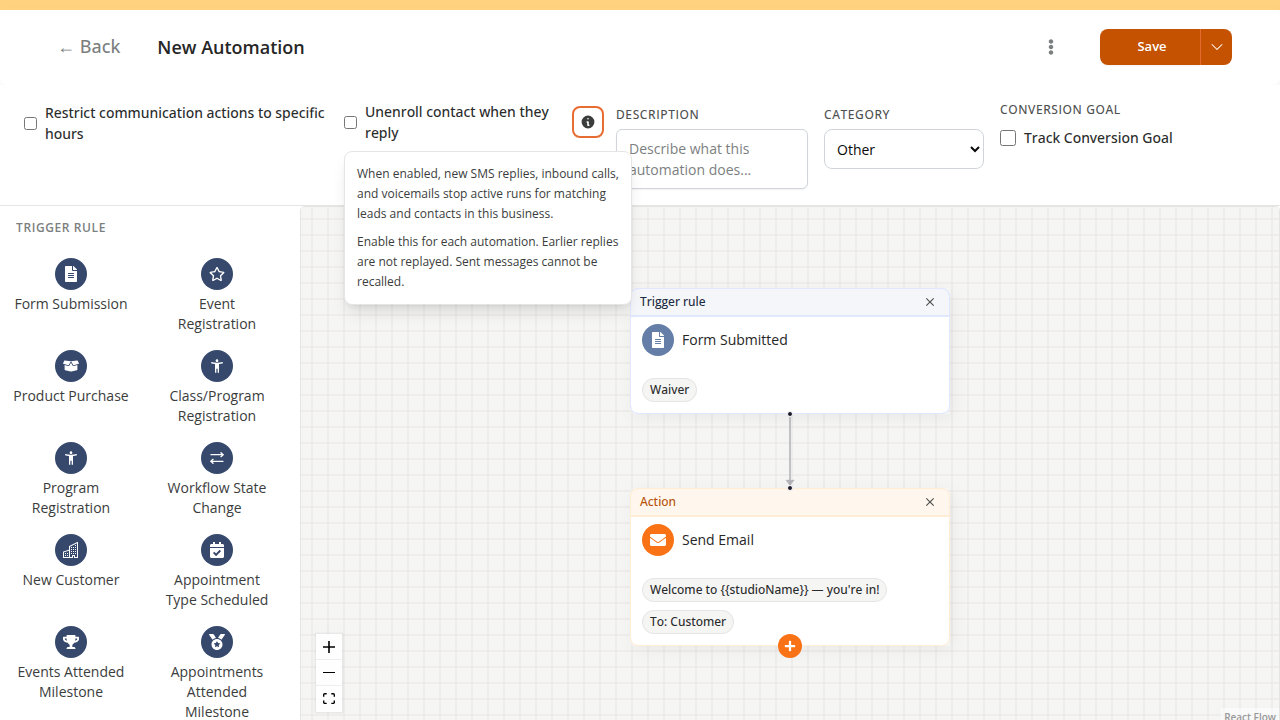
Earlier replies are not replayed, and messages already sent cannot be recalled. The builder lists SMS replies, inbound calls, and voicemails. Inbound messages in other inbox channels, such as email, also stop runs when the conversation is linked to a contact.
Review automation history when checking a run. If you test an automation, remember that its communication actions can send real messages; use contact details you control.
Need a hand?
Email our team at support@joinzipper.com and we'll usually reply within a few hours.
Was this article helpful?
Thanks for your feedback.