How to Split a Shared Appointment Type by Duration
Turn a multi-duration shared appointment type into separate shared types while keeping connected schedules and existing bookings.
How to Split a Shared Appointment Type by Duration
Use Split by duration when the durations in one shared appointment type need separate settings.
-
Go to Schedule > Calendar > Manage > Appointment types. Under Shared appointment types, find the service you want to split.
-
Select Split by duration. The action appears when the type has at least two active durations.
-
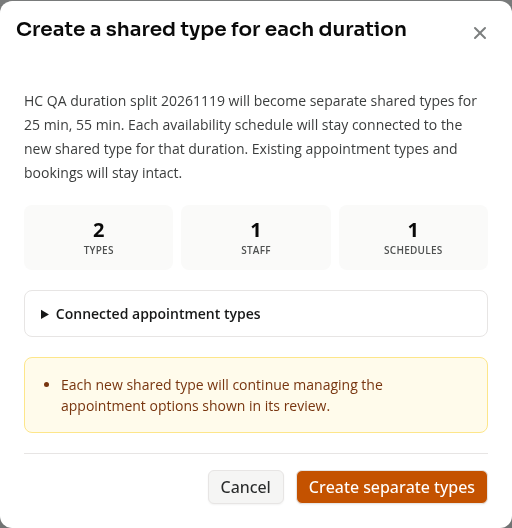
Read Create a shared type for each duration. Review the duration options, staff and schedule counts, and Connected appointment types. Check any product access notes that appear for your service.
-
Select Create separate types. Each new shared type manages one duration and stays connected to the corresponding schedule offerings. Existing appointment options and bookings stay intact.
-
Check the new cards in Shared appointment types. The original card is marked Retired. Use Edit on a new card when you want to change that duration’s settings separately.
See Shared Appointment Types Explained for how settings flow from a shared type to its schedule offerings.
Need a hand?
Email our team at support@joinzipper.com and we'll usually reply within a few hours.
Was this article helpful?
Thanks for your feedback.