How to Set Eligibility for an Intro Offer
Mark a one-time intro offer and choose subscriber, purchase-history, and date restrictions.
How to Set Eligibility for an Intro Offer
Mark an eligible one-time product as an Intro offer to include its purchases in the Intro Offer Conversion report. You can also restrict who can buy it. These rules are separate from introductory pricing for a monthly subscription.
- Go to Products & Services > Products and choose Edit on a one-time product, or start creating one.
- Open Details and find Limits & access. Turn on Intro offer.
- Under Intro offer eligibility, choose any restrictions you need:
- Non-subscribers only excludes customers with an active paid membership.
- First-time clients only limits the offer to customers without prior purchases or subscriptions at your organization.
- Eligibility window limits the offer by the date the customer was added. Leave it blank for no date restriction.
- Review the product’s purchase limit, price, access and visibility, then Save or complete the product-creation steps.
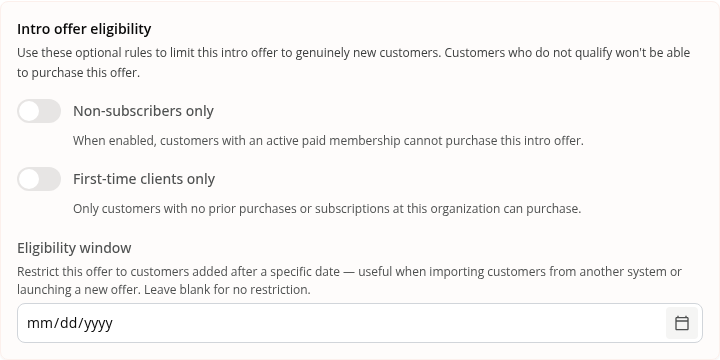
The eligibility controls are optional; turn on only the rules you intend to enforce. A customer must qualify under the rules you choose. A purchase limit is a separate control: if the offer should be available once per customer, set the limit accordingly.
Turning off Intro offer clears its eligibility settings. If you turn it on again, review and set the rules again before saving. If the switch is missing, check that you are editing an eligible one-time product.
Need a hand?
Email our team at support@joinzipper.com and we'll usually reply within a few hours.
Was this article helpful?
Thanks for your feedback.