How to Follow Up When Booking Credits Run Low
Use the Credits Remaining trigger to follow up after a finite-credit balance crosses a threshold.
How to Follow Up When Booking Credits Run Low
Use Credits Remaining to start an automation when a customer’s finite booking-credit balance falls to a chosen threshold or lower. Connect a message or another action to decide what happens next.
Configure the Trigger
- Go to Marketing > Automations > New Workflow and choose Start from Scratch, or open an existing draft.
- Select Credits Remaining from the trigger list.
- Under Credit product (optional), choose a specific finite-credit product, or leave Any finite-credit product selected.
- Enter a whole number of zero or more in Credits remaining threshold. For example, 2 watches for a balance crossing from above two to two or fewer.
- Close the trigger panel. Select + beneath the trigger and add the action you want, such as Send Email or Create Task. Configure its recipient and details, and review the connections.
- Use Save options > Save draft while preparing the workflow, then publish when ready.
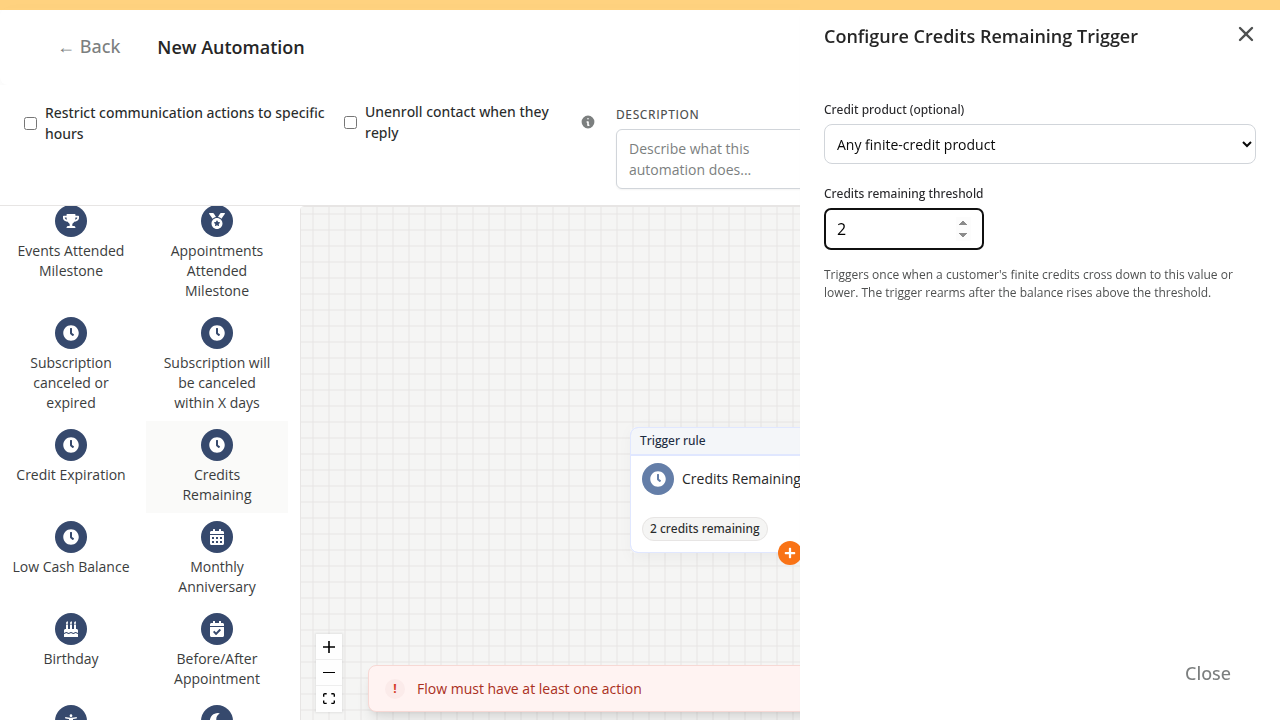
The example shows the trigger before an action is added; the builder requires an action for the flow.
Understand When It Runs
The trigger watches for a crossing, not simply any balance already at or below the threshold. A customer already below the threshold when the automation is established is not automatically a catch-up send. After the balance rises above the threshold, a later crossing down can trigger again.
Balances are evaluated for a customer and product. Unlimited access is handled differently from finite credits, and a decrease caused only by expiration does not itself trigger this workflow. If you need an expiry reminder, review the separate Credit Expiration trigger instead.
Test and Review
Review the message, customer selection, and any purchase link before publishing. Testing an automation can send real email or SMS to the test destination; use contact details you control. A message test alone does not prove a real balance crossing occurred.
Use Execution History to inspect runs. If an expected follow-up is missing, check the product filter, the customer’s finite credits, the threshold, whether the balance crossed after the trigger was established, and the workflow status. See How to Check Your Booking Credits in the Customer App for the customer-facing view.
Need a hand?
Email our team at support@joinzipper.com and we'll usually reply within a few hours.
Was this article helpful?
Thanks for your feedback.