How to Find Upcoming Customer Birthdays
Check whose birthday is coming up and download your studio’s birthday list.
How to Find Upcoming Customer Birthdays
Use Upcoming Birthdays to see which customers have a birthday coming up. The report uses birthdays saved on customer profiles and counts days in your studio’s time zone.
- Go to Reporting > Past > Reports and click Select a report.
- Open Upcoming Birthdays.
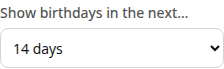
- Set Show birthdays in the next… to 7, 14, 30, 60, or 90 days.
- Use Birthday Date and Days Until Birthday to plan your follow-up. If you see No data found, try a longer window.
- Click Download if you need a CSV of the selected list.
If a profile has a birth month and day, the customer can appear even when Upcoming Age is blank. The report includes Email where available. To send a birthday offer automatically, see How to Set Up a Birthday Offer Automation.
Need a hand?
Email our team at support@joinzipper.com and we'll usually reply within a few hours.
Was this article helpful?
Thanks for your feedback.