How to Apply a Discount to an Existing Subscription
Choose a fixed amount or percentage discount and how long it applies to an eligible Stripe subscription.
Apply a percentage or fixed-amount discount to one existing Stripe subscription. If the subscription already has a discount, the new one replaces it.
-
Open Products & Services → Products. Open the recurring product’s Actions menu and select View subscribers.
-
Find the customer’s subscription, open its Actions menu, and choose Apply discount.

-
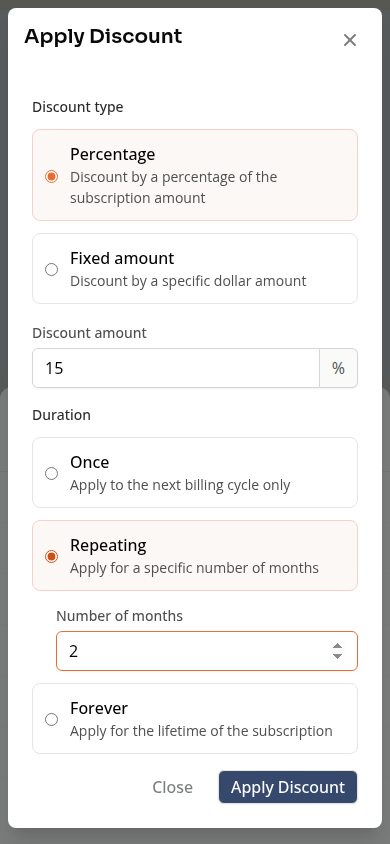
Choose Percentage or Fixed amount and enter the Discount amount.
-
Choose a Duration.
- Once applies to the next billing cycle.
- Repeating applies for the Number of months you enter.
- Forever applies for the life of the subscription.
-
Select Apply Discount and check the result.
You can also find Apply discount in the Actions menu under Contacts → Customers → Billing & payments. To offer a code customers can redeem at checkout, see How to Create Coupon Codes and Discount Rules.
Need a hand?
Email our team at support@joinzipper.com and we'll usually reply within a few hours.
Was this article helpful?
Thanks for your feedback.