How to Add Skills and Rank Requirements
Create a skill and make it a requirement for one or more ranks in your Belt Tracking system.
How to Add Skills and Rank Requirements
Use Skills Library to define a skill and make it a requirement for a rank. Your organization needs Belt Tracking access and permission to manage rank systems.
Create a Skill
- Go to Settings > Skills Library and choose Add Skill.
- Enter a Title and select a Measurement Type. Choose Sessions, Repetitions, Duration (min), or Pass/Fail based on how staff record progress.
- Optionally add a Category, Description, or Video URL. Choose Create.
Bind a Skill to a Rank
- Find the skill and choose Bind to Rank. The button can show Manage bindings after you open its binding controls.
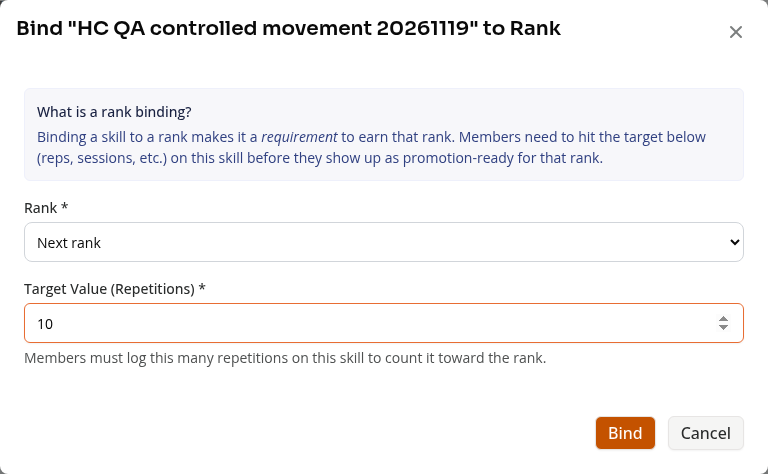
- Choose the Rank under its rank system. For a counted skill, enter the Target Value, such as 10 repetitions. A Pass/Fail skill uses the pass result.
- Choose Bind. Check the binding count on the skill card.
Use Edit on the card to update the skill. The binding list has a Remove action for each rank requirement. Deleting a skill removes all of its rank bindings.
If the rank you want is missing, add it to a rank system first.
Need a hand?
Email our team at support@joinzipper.com and we'll usually reply within a few hours.
Was this article helpful?
Thanks for your feedback.