Turn an empty studio session into a private group experience
Offer eligible empty classes or appointment slots as private sessions with one clear buyout price.
A group of friends wants a class together. A local team is planning an outing. Someone asks whether they can have the studio session to themselves.
With session buyouts, you can give that request a clear booking option: a flat price for an eligible empty class or appointment slot. The client reserves the whole session, and Zipper closes it to ordinary bookings.
Start with an empty session
Buyouts are for eligible empty occurrences. A session with existing registrations, waitlist entries, or active booking/payment holds is not the same offer.
That protects the people who have already expressed interest or begun booking. You are not selling exclusivity over the top of someone else’s place.
Think of the option as another way to sell an available session, rather than a way to displace an existing class.
Set a price for the private experience
Open the timeslot, choose Edit, enable Allow private session buyout, and set the price. Review the customer-facing details so the offer is clear before sharing it.
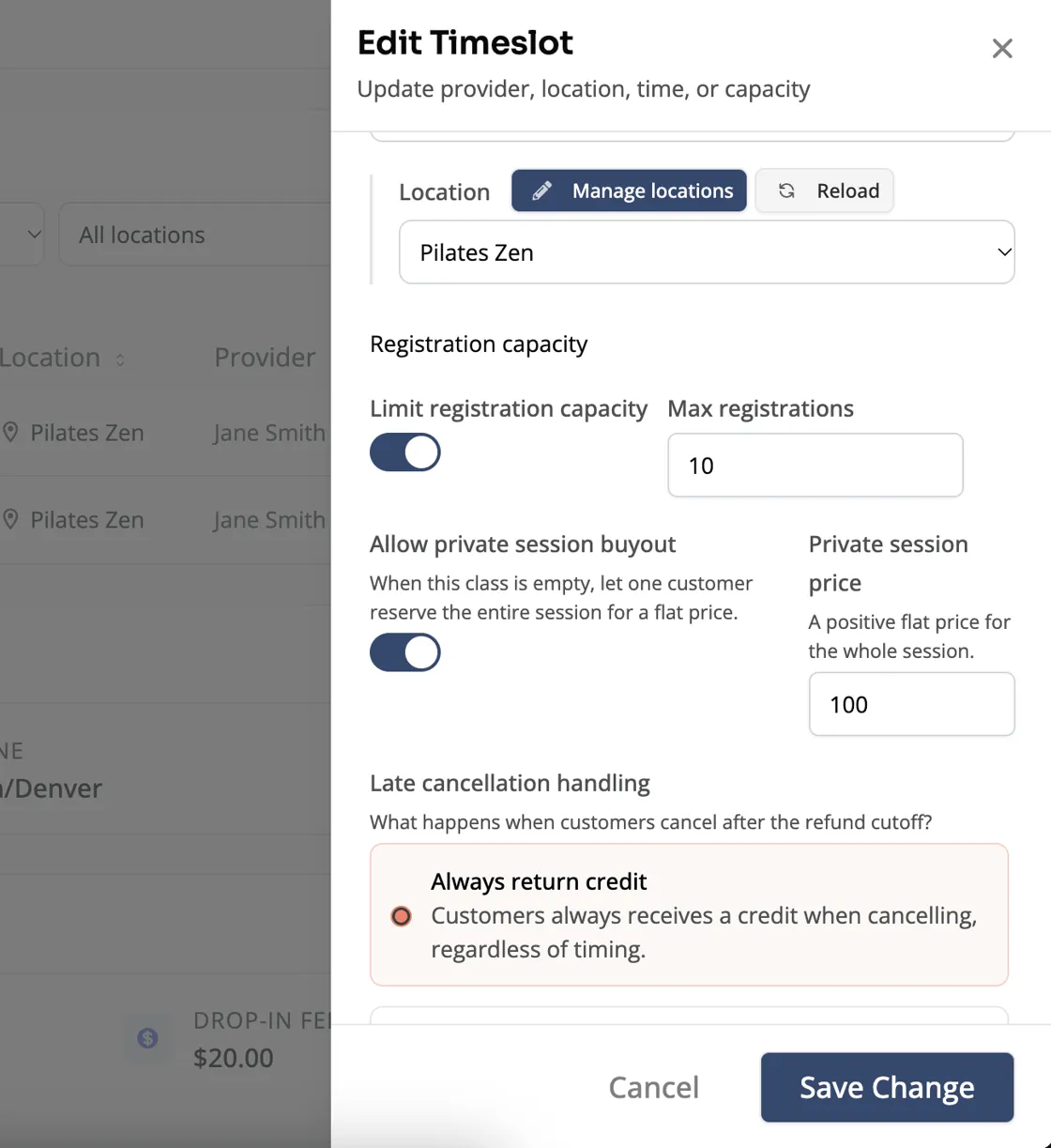
Use a price that reflects the private experience you are offering. The buyout is a monetary purchase; a class-pack credit or an ordinary membership is not a substitute for its flat fee.
Let the booking carry the reservation
When a client successfully buys out the session, it becomes unavailable through the ordinary booking paths. Your team can see the private reservation in the schedule you already use, rather than relying on a note in a separate calendar.
Availability is checked as the purchase completes. If another booking makes the session ineligible first, it cannot still be sold as an empty private session.
For a studio, that removes a common source of awkward coordination: one person promising the room privately while someone else is still treating it as a public class.
Be clear about cancellation
The occurrence’s normal cancellation and refund policy applies unless you configure the supported buyout-specific fee settings. Review those settings before promoting a private offering, and make sure your team can explain the terms.
After an eligible cancellation and its financial processing complete, the session can reopen through the normal workflow. Do not assume that removing a calendar note is equivalent to canceling the paid booking.
Offer it where it makes sense
A buyout can be useful for a group celebration or an occasional private experience. A multi-session retreat is a different shape of offering; program pricing is a better place to start when someone needs an itinerary spanning several sessions.
For the right empty slot, a private buyout turns a back-and-forth inquiry into an offer a client can understand and book.
Explore class management or read the September 14-28 update.