What the Meta Integration Email Is
If you receive an email about your "Meta connection expiring" or "Facebook/Instagram integration needs renewal," here's what it means and what to do.
What the Email Means
Zipper connects to Meta (Facebook/Instagram) to power Marketing Copilot — automatic social media content generation and scheduling. Meta access tokens expire every ~60 days, and Zipper sends a warning email before expiration. If the token expires without renewal, Zipper can no longer post to your Facebook or Instagram pages automatically.
This is a legitimate Zipper notification, not a phishing email. If in doubt, log into your Zipper dashboard directly to check integration status.
How to Renew the Connection
- Go to Settings > Integrations → Facebook & Instagram section.
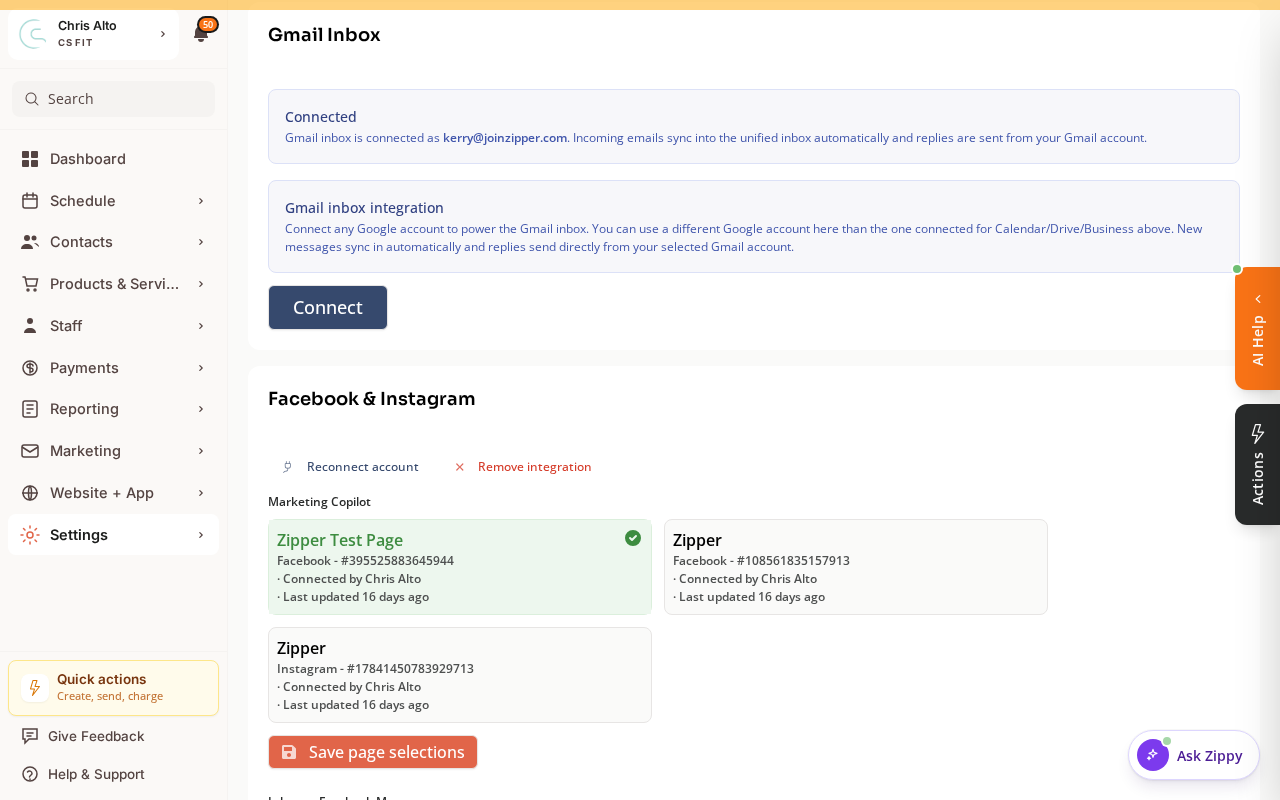
- Click Reconnect account, then log in to Facebook and re-authorize Zipper.
You’ll need to reconnect roughly every 2 months — this is a Meta requirement. Consider setting a calendar reminder for 50 days after each reconnection.
Troubleshooting
I reconnected but Marketing Copilot still isn’t posting. Check that the correct Facebook Page is selected after reconnecting — the page selection sometimes resets during reconnection.
Need a hand?
Email our team at support@joinzipper.com and we'll usually reply within a few hours.
Was this article helpful?
Thanks for your feedback.