How to Set Up Revenue Forecasts and Monthly Goals
Set business assumptions, enter monthly revenue goals and choose how Zipper models your revenue forecast.
How to Set Up Revenue Forecasts and Monthly Goals
Open Reporting > Next > Forecast and choose Revenue & Projections. Use Monthly Goal Progress and Goal vs. Projection Timeline to compare your targets, recorded revenue, and projected results. The Reporting page requires the Manage Org Reports permission, and the Forecast tab also requires View Org Financials.
Enter Your Business Assumptions
- Click Business Setup at the top of the Forecast page.
- Set your Margin target and enter Shared costs / month and Marketing spend / month for the current month. Under Operating costs by location (monthly), enter each location’s rent, staffing, utilities, and other costs.
- Review the member assumptions. Leave Avg revenue / member (override) at zero to use the calculated value when available. LTV horizon sets the number of months used for lifetime value estimates. Industry churn benchmark is a comparison percentage.
- Review Data Health, which shows gaps that can affect the figures, such as appointments without an assigned location. Then click Save.

Set Monthly Goals and Revenue Inputs
- Choose Configure > Monthly Goals. Enter each month’s revenue target, then click Save. Show 6 more months reveals more rows. The timeline also has Edit Goals.
- Choose Configure > External Revenue to enter monthly amounts that are outside Zipper’s payment records, including historical revenue from before you used Zipper. Enter the amount in the relevant month and click Save.
Choose the Forecast Model
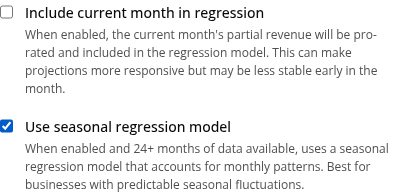
Go to Configure > Settings to open Projection Settings.
- Include current month in regression includes a prorated estimate for the current month’s partial revenue.
- Use seasonal regression model accounts for monthly patterns when at least 24 months of data are available.
Click Save. Check the forecast against the recorded revenue and goals in the timeline.
Need a hand?
Email our team at support@joinzipper.com and we'll usually reply within a few hours.
Was this article helpful?
Thanks for your feedback.