How to Set Attendance Milestones
Choose the class counts and labels your studio uses to recognize member attendance.
Use milestones to recognize a member’s progress, such as their first class or their 50th class.
-
In the staff dashboard, open Settings → Thresholds & Milestones.

-
Select Attendance milestones.
-
Edit an existing milestone, or select Add milestone to make a new one.
-
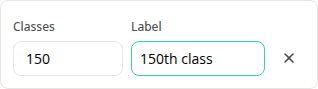
Set Classes to the number the member needs to reach. Enter the text you want staff to see in Label, such as “150th class.”
-
Select Save.

Staff see the milestone for the class where the member reaches it. It can also appear on the kiosk for that class when milestone badges are enabled there.
Need a hand?
Email our team at support@joinzipper.com and we'll usually reply within a few hours.
Was this article helpful?
Thanks for your feedback.