How to Find Upcoming Events in the Customer App
Find the event schedule under Book, choose the right date or location, and look up events you have already booked.
How to Find Upcoming Events in the Customer App
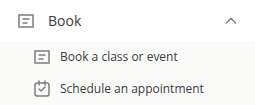
Open Book to browse your studio’s upcoming events. On a phone, Book is in the bottom navigation. On a computer, it’s in the sidebar.
- Choose Book a class or event if your studio combines classes and events. If it offers separate booking options, choose Register for an event.
- Use the date picker to move to the day of the event. Choose Today to return to the current date.
- If you see a location picker, choose All Locations while looking for the event. Check Filters if you’ve narrowed the schedule.
- Open the event to read its details and see the available registration options.


If You Still Can’t Find the Event
- Check the studio name. If you’re in the wrong studio, switch accounts.
- Use the booking schedule for browsing. Use More > Reservation History on a phone to look up a booking you’ve already made.
- If Book is missing or the event still doesn’t appear, ask the studio for its current registration link.
Need a hand?
Email our team at support@joinzipper.com and we'll usually reply within a few hours.
Was this article helpful?
Thanks for your feedback.