How to Customize Your Business Display Name
Your business display name appears throughout Zipper — in emails, the customer app, notifications, and more. Here's how to update it.
Steps
- Go to Settings > Organization Settings, on the Company details tab.
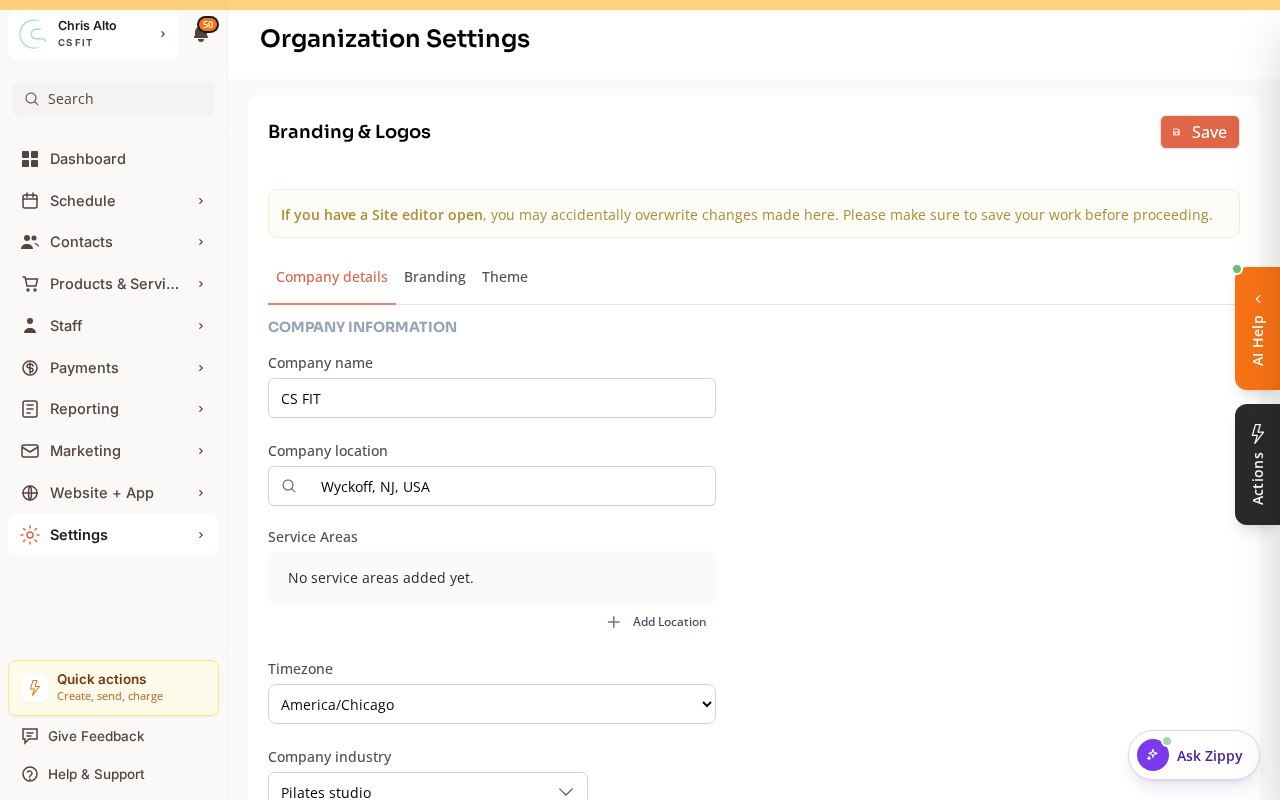
- Update: the Company name field
- Click: Save
- Expected: Business name updated across the platform
Where the Business Name Appears
- Customer-facing app and booking page header
- Confirmation emails (“Thank you for booking with [Business Name]”)
- SMS notifications
- Stripe receipts and invoices
- Marketing emails
Tips
- Be consistent: Use the same name you use on your website, social media, and Google Business Profile.
- Short names display better: Very long business names can get truncated in mobile notifications. Test on a mobile device after updating.
Troubleshooting
The old name is still showing on some pages. Some areas cache the name for performance. Try refreshing the page or clearing your browser cache. Customer-facing changes may take a few minutes to propagate.
I want a different name for emails vs. the app. The business name is a single setting — it appears everywhere. For email-specific customization (like a different “From” name), see your verified sender email settings.
Need a hand?
Email our team at support@joinzipper.com and we'll usually reply within a few hours.
Was this article helpful?
Thanks for your feedback.