How to Check an Unfinished Point-of-Sale Payment
Check the original card payment, complete an external payment record, or recover an existing Point-of-Sale order.
If the result of a sale is unclear, check the original payment before charging for the same items again.
Check a card payment for merchandise
-
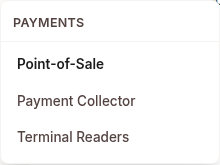
With the staff account that started the sale, open Payments → Point-of-Sale and look for Unfinished card payments. If you see Check original payment in the payment alert, use it to open the original payment on this page.
-
Find the checkout by its reference and items. Choose Check payment status. The check uses the original checkout and does not charge the customer.
-
Use the result to decide what to do next.
- Sale complete means the paid items are confirmed. Check each item: an item marked Not charged was declined and can be reviewed separately before charging it again.
- Payment not taken and No payment was taken mean you can start a new sale. If the open checkout says no payment was taken and offers a retry, follow its prompts to retry the unpaid items. If an open sale shows X of Y items charged successfully, select Retry Failed Items to retry only the declined items. Items that were already charged stay paid.
- Payment in progress or Not confirmed yet means the result is still pending or unclear. Keep the original checkout and check its status again before starting another charge for those items. If a card charge does not return a clear result, Zipper checks its status for about 45 seconds. If it still cannot confirm the charge, the sale shows Payment could not be confirmed. Check payment status before charging again.
If the list says Showing the oldest 50 unfinished checkouts, resolve the displayed checkouts to reveal more. Check the reference and items before acting on any payment.
If a sale shows The original payment status is unavailable. Verify the payment before charging again., use the steps above to verify the payment before charging those items again.
Finish recording an external payment
If you see Payment completion needs attention after recording a payment you collected outside Zipper, keep the sale open and choose Retry completion. If it stays unresolved, use Contact support and include the Sale reference shown in the alert.
Recover an unfinished order
Follow the available action on the existing order. Use Refresh status to check an uncertain result. If the order offers Continue this order or Retry this order, use that action to resume it from the existing order. If you need help, use Contact support with the Support reference.
For a new sale, see How to Process Payments with Point-of-Sale.
Need a hand?
Email our team at support@joinzipper.com and we'll usually reply within a few hours.
Was this article helpful?
Thanks for your feedback.