How to Book an Appointment in the Customer App
Choose a provider, an appointment type, and an available time in your studio’s customer app.
Sign in to your studio’s customer app and open Book → Schedule an appointment.

-
Choose a provider. When asked who you are booking for, select yourself or an eligible family member.
-
Choose the Appointment Type and the date. Use Timezone to check which local time the schedule displays.
-
Choose an available time.
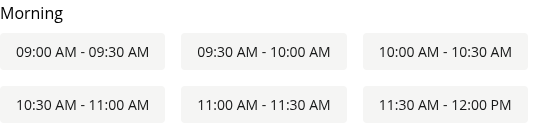
-
Review Appointment details and the Payment Options shown for that booking. Follow the booking steps to finish, including any required forms or payment.
-
Check My calendar → Active Bookings for the confirmed appointment.
If you see no times for the date, try another date or provider. If the appointment type allows several times in one booking, see How to Select Multiple Appointment Times in the Customer App.
Need a hand?
Email our team at support@joinzipper.com and we'll usually reply within a few hours.
Was this article helpful?
Thanks for your feedback.