How to Add Home Buttons to Your Customer App
Add, reorder, and show website, phone, or email shortcuts on your studio’s customer app home page.
Add shortcuts to your customer app’s home page. A button can open a web page, start a phone call, or open a new email.
-
In the staff dashboard, open Website + App → Customer App → Home buttons.
-
Select Add button.

-
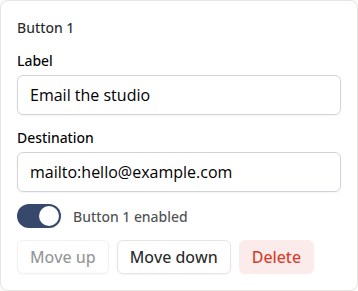
Enter a short Label that tells customers what the button opens. In Destination, enter one of these:
- Website:
https://example.com/studio-resources - Phone:
tel:+12025550104 - Email:
mailto:hello@example.com

- Website:
-
Keep the button’s enabled switch on to show it. Use Move up or Move down to change the order. Customers see enabled buttons in that order.
-
Select Save Changes. Open the app as a customer and try the button.

Need a hand?
Email our team at support@joinzipper.com and we'll usually reply within a few hours.
Was this article helpful?
Thanks for your feedback.