Can I Embed a Custom HTML Intake Form on Zipper?
Not directly — but Zipper has a built-in form builder that handles intake forms, waivers, and registrations. Here's what's possible.
What Zipper Supports
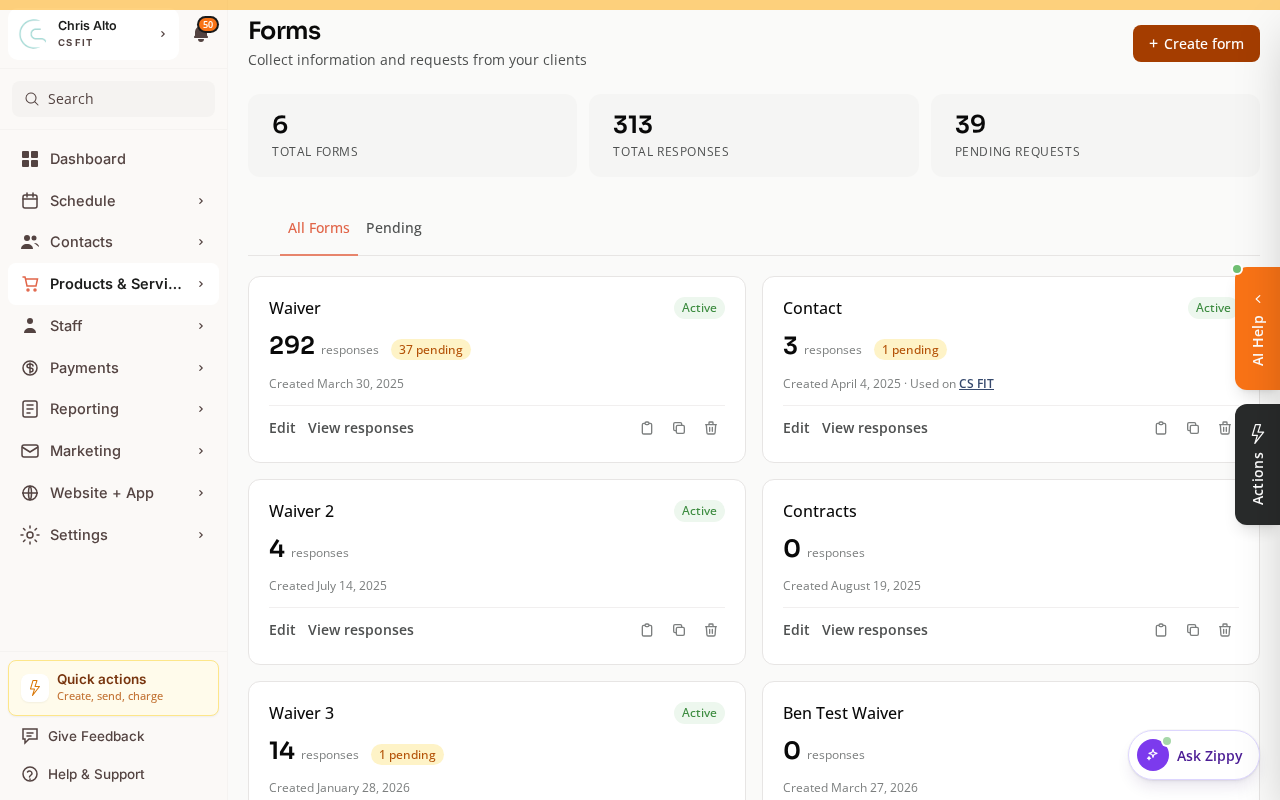
Zipper’s native Forms feature lets you:
- Create custom intake forms with text fields, dropdowns, checkboxes, and signature/waiver fields
- Attach forms to classes, appointment types, or products (require completion before booking)
- Trigger automations when a form is submitted
- View responses in the admin dashboard
Forms are built inside Zipper — no external HTML required. You’ll find them under Products & Services > Forms.
Can I Embed an External HTML Form?
You cannot embed a raw HTML <form> tag inside Zipper’s booking flow — responses must go through Zipper to be associated with customer profiles.
You can embed a third-party widget (Typeform, Google Forms, JotForm) on a Zipper website page, but responses won’t auto-sync to customer profiles.
When to Use Each
- Zipper Forms — waivers customers must sign before booking, intake questionnaires at purchase, data stored on the customer profile
- External embed — complex multi-page logic Zipper’s builder doesn’t support, general contact forms, or tools you already use
How to Create a Form in Zipper
- Go to Products & Services > Forms
- Click New Form
- Add fields (text, email, phone, multiple choice, signature, waiver text)
- Attach to a class, appointment type, or product to require completion before booking
Troubleshooting
Need conditional logic (show field X only if answer Y)? Zipper’s builder has basic conditional logic. For complex branching, use a Typeform or JotForm embed on your website page (separate from the booking flow).
Need a hand?
Email our team at support@joinzipper.com and we'll usually reply within a few hours.
Was this article helpful?
Thanks for your feedback.