Can You Start a Membership in the Past?
Eligible staff checkout flows support a controlled past start date; review the first charge and access before payment.
Can You Start a Membership in the Past?
Yes. Eligible staff checkout flows let you choose Start in the past and an allowed start date. The older claim that Zipper can never backdate a membership no longer describes the current product.
Where to Find It
Open Payments > Point-of-Sale, select a customer, and choose the recurring product. In When should the membership start?, choose Start in the past.
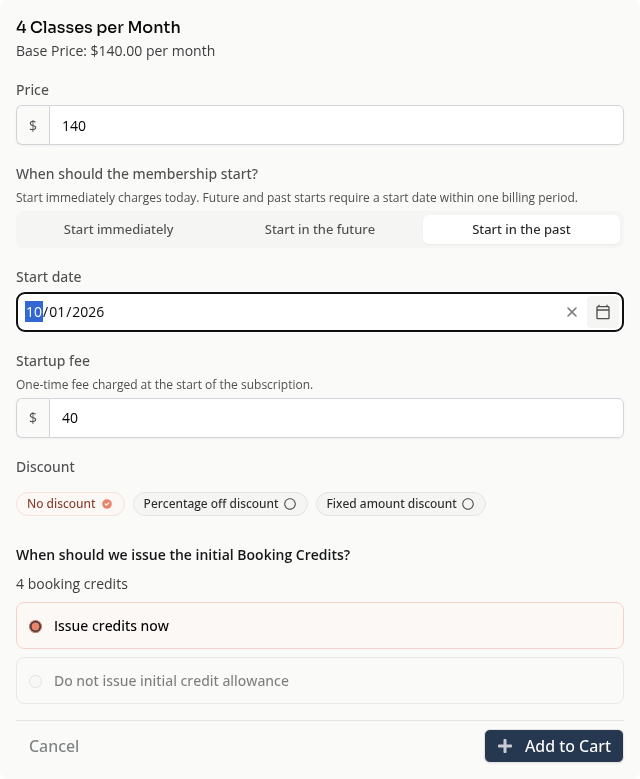
Use the date range the editor allows. Check the charge due today, startup fee, initial booking credits and next billing date before continuing.
What Backdating Does
A past start sets the membership’s access date. It does not move today’s actual payment into a past transaction date. Billing and credit choices depend on the product and checkout flow.
Do not add a separate charge for a missed period until you have checked what the membership checkout will charge. Otherwise, you may collect money for the same period twice.
When the Date Is Too Old
Normal checkout has date limits. If the needed date is outside them, use the appropriate migration or support workflow. Starting today and adding a separate adjustment is a different operation; review its effect before choosing it.
On Mobile
The same past-start option appears in the product setup.
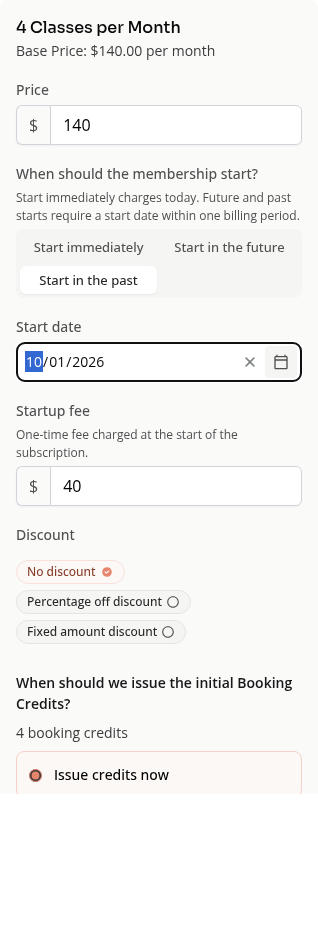
See Membership Start Dates and Backdating Explained for immediate, future and past starts.
Need a hand?
Email our team at support@joinzipper.com and we'll usually reply within a few hours.
Was this article helpful?
Thanks for your feedback.