How Stripe Payout Schedules Work
When a customer pays through Zipper, the money lands in Stripe first. Stripe then deposits it into your bank account on a schedule called a payout. This guide explains when to expect your money and where to check your payout settings.
How Payouts Work
Every payment Zipper processes goes to your Stripe balance first. Stripe then transfers that money to your bank account automatically, based on your payout schedule. This is separate from Zipper — it’s handled entirely by Stripe.
Default Payout Timing
| Account status | Typical timing |
|---|---|
| Verified US account | ~2 business days after payment (T+2 rolling) |
| New or unverified account | 7–14 days while Stripe reviews the account |
| ACH bank payments | Add 5–7 more days on top of the standard schedule |
Example: A card payment made on Monday typically deposits to your bank on Wednesday or Thursday. An ACH payment made Monday may not deposit until the following week.
Where to Check Your Payout Schedule
Get to your Stripe account from Zipper at Settings → Integrations → Stripe → Manage Stripe account.
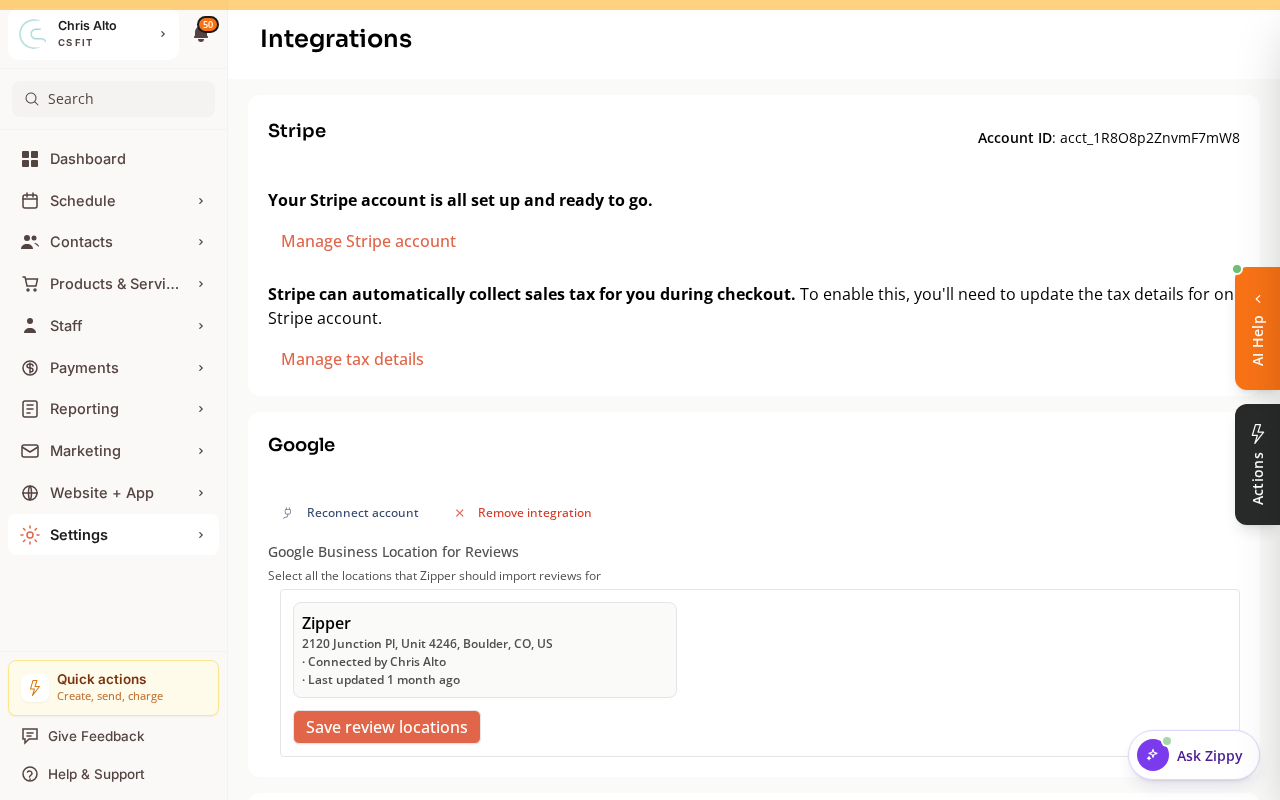
Your payout schedule itself is set in the Stripe Dashboard (not in Zipper):
- Log in at dashboard.stripe.com
- Go to Settings → Payouts
- You’ll see your current schedule (daily rolling, weekly, or monthly) and the bank account on file
To see upcoming deposits:
- In the Stripe Dashboard, go to Balance → Payouts
- You’ll see a table of upcoming deposit dates and amounts
Changing Your Payout Schedule
In Settings → Payouts in the Stripe Dashboard, you can switch between:
- Daily rolling (default for verified accounts) — money deposits ~2 days after each payment
- Weekly — deposits once per week on a day you choose
- Monthly — deposits once per month
Most studios keep daily rolling for the fastest access to funds.
Tips
- New accounts: Stripe typically holds your first payouts for 7–14 days while verifying your business. This is normal and resolves automatically once your account is verified.
- ACH payments deposit slower: If you receive a lot of ACH payments, expect those funds to take longer. See our ACH guide for details.
- Instant Payouts: For eligible Stripe accounts, Instant Payouts deposit within 30 minutes (a fee applies). You can enable this in the Stripe Dashboard.
Troubleshooting
“Why is my money delayed?” Common causes:
- Your Stripe account is new (7–14 day hold lifts automatically)
- The payment was ACH (add 5–7 days)
- Stripe put a temporary hold for risk review — check the Stripe Dashboard for notifications
- Bank holiday — payouts don’t process on US bank holidays
“My expected payout is missing” Check Balance → Payouts in the Stripe Dashboard. A failed payout usually means your bank account details are incorrect or the account was closed. Update your bank info in Stripe to retry.
“Can I get paid faster?” Daily rolling is the fastest automatic option. Instant Payouts are available for eligible accounts with a small fee. Both are managed in the Stripe Dashboard — Zipper doesn’t control payout timing.
Need a hand?
Email our team at support@joinzipper.com and we'll usually reply within a few hours.
Was this article helpful?
Thanks for your feedback.