How Credits, Booking Credits, and Subscriptions Work Together
Zipper uses three building blocks for class and appointment access. Here's what each one is and how they interact.
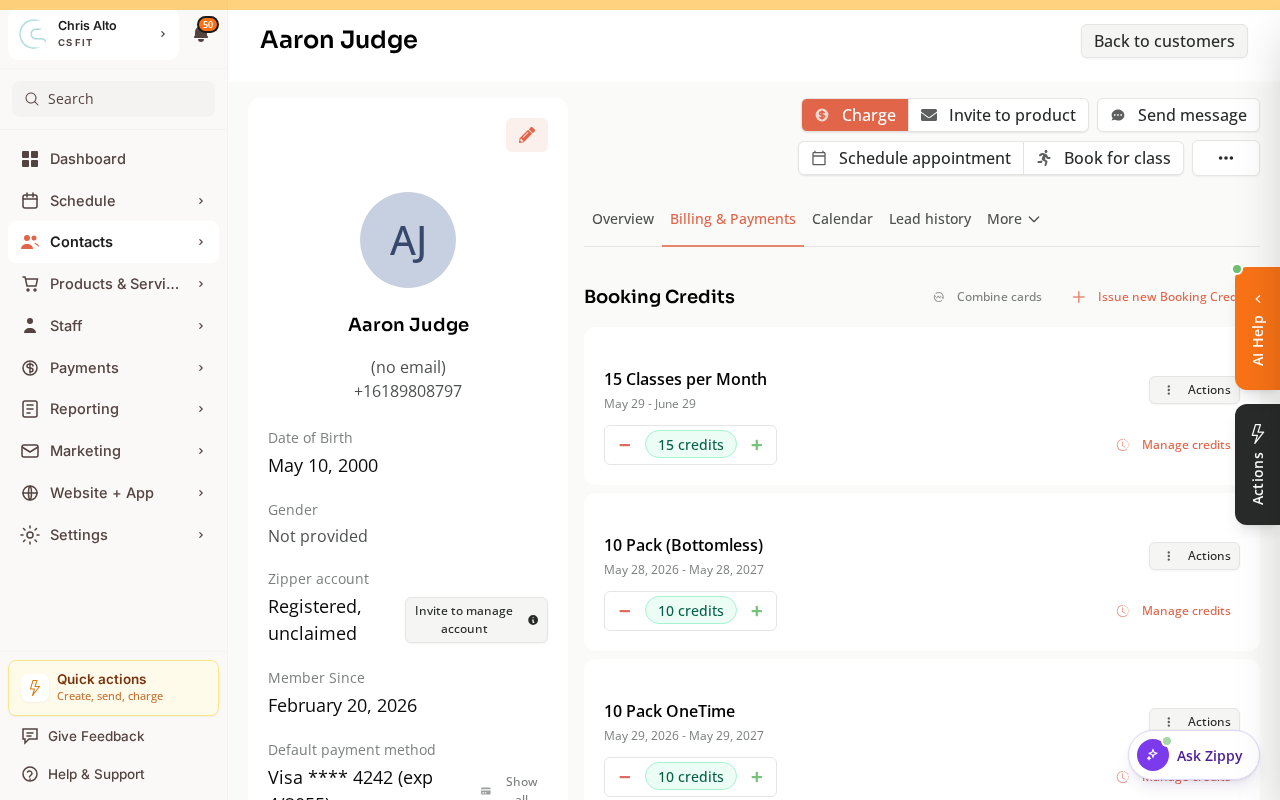
You can see all three on a customer’s Billing & Payments tab: their subscriptions and punch cards, each with its remaining Booking Credits.
The Three Building Blocks
Booking Credit
A Booking Credit is one “use” — it unlocks access to a single class, event, or appointment. Credits come from two sources:
- Booking Credits — bought as a fixed bundle upfront
- Subscriptions — auto-issued at the start of each billing period
Booking Credits
A booking credits is a bundle of Booking Credits purchased as a one-time product. Examples:
- “5-class pack” → 5 Booking Credits
- “10-session booking credits” → 10 Booking Credits
Key characteristics:
- Credits expire on the booking credits’s expiration date — unused credits are lost at expiration (no rollover)
- The system automatically uses the credits expiring soonest to minimize waste
- Can be restricted to specific class types or appointment types
Subscription (Membership)
A subscription is a recurring billing product. A subscription can grant:
- Unlimited access — no credit deducted per class; member can attend as many eligible sessions as they want
- Credits per period — a fixed number of Booking Credits issued at each renewal (e.g., 4 credits/month)
- Drop-in discounts — reduced drop-in price for subscribers
Subscription credits expire at the end of the billing period — they do not carry over to the next period.
How They Work at Checkout
Members can have booking credits, a subscription, or both. At checkout, Zipper shows all payment options the member is eligible for:
| Option shown at checkout | When it appears |
|---|---|
| Use Booking Credit (booking credits) | Member has valid booking credits for this booking type |
| Use Booking Credit (subscription) | Member has subscription credits valid this period for this booking type |
| Unlimited (subscription) | Member has an active unlimited subscription for this class/appointment |
| Pay drop-in price | Always shown if a drop-in price is configured |
The member chooses which option to use. The system doesn’t automatically apply a credit.
Admin override: Staff can manually apply a credit in the Payment Collector when charging an unpaid booking.
Which Credit Gets Used First?
When a member has credits from multiple booking credits, the system automatically selects the one expiring soonest — to reduce waste.
Example:
- Booking Credits A: 3 credits, expires June 30
- Booking Credits B: 5 credits, expires September 30
Booking a class today → Booking Credits A’s credit is used first.
Booking Credits vs. Subscription Credits
| Booking Credits | Subscription Credits | |
|---|---|---|
| How issued | One-time purchase | Auto-issued at each billing renewal |
| Expiration | Fixed date set at purchase | End of the billing period |
| Rollover? | No | No |
| Can coexist? | Yes — a member can have both | Yes |
Booking Ahead (Book-Ahead)
Some subscriptions let members book into the next billing period before it starts. This is called Book-Ahead:
- Current period credits may be used for upcoming sessions
- If the subscription renews successfully, the bookings are confirmed
- If the renewal fails, Book-Ahead bookings enter a grace period
What Happens When a Member Cancels
| Timing | What happens to the credit |
|---|---|
| Within the cancellation window | Credit returned automatically |
| Outside the cancellation window | Credit not returned; studio can restore it manually |
| Leaving a waitlist | Credit always returned |
Setting This Up
- Go to Products & Services > Manage Plans
- Choose Booking Credits or Subscription
- Set price, number of credits (or unlimited), expiration period, and eligible class/appointment types
Tips
- Adding credits manually: Go to the member’s profile → Billing & Payments → Issue new Booking Credits.
Troubleshooting
Member says their credit wasn’t applied? Check: (1) credit exists and hasn’t expired, (2) credit is valid for that class/appointment type, (3) member selected the credit option at checkout — it’s not auto-applied.
Member lost credits at subscription renewal? Subscription credits expire at period end by design — they don’t roll over.
Need a hand?
Email our team at support@joinzipper.com and we'll usually reply within a few hours.
Was this article helpful?
Thanks for your feedback.